Technical Articles
JummBox Tutorial: Build a Harder-Edged Electronic Track
In this article
- Hear the destination, then take it apart
- What JummBox adds beyond BeepBox
- Set up the song before entering notes
- Build drums that leave room for the bass
- Give the bass a short, articulate FM attack
- Write a melody that can answer itself
- Use harmony to give the loop a destination
- Arrange 32 bars with a beginning, a change and an ending
- Try JummBox’s song-level modulation
- Export audio, save the project and share the right link
- Troubleshooting: silence, wrong notes and incomplete exports
- JummBox FAQ
A good electronic track needs something to push against: a bass note that lands between the kicks, a melody that leaves a little space, and a change of scene before the loop wears out its welcome. In this JummBox tutorial, we’ll build those decisions into an original 32-bar track called Neon Relay. It runs at 126 BPM in A minor and takes about a minute to get from its opening to its final hit.
If you have worked through our BeepBox dance-track tutorial, you already know the pattern-grid basics. Here we’ll spend more time on FM bass, synthesizer character, harmony, effect envelopes and arrangement. New to both programs? Read that guide first, or open the included projects and use the examples here as a guided dissection.
Open the official JummBox application. You can also find it in TAM’s JummBox software directory entry. The walkthrough and captures use JummBox 2.6.
Hear the destination, then take it apart
Open the complete Neon Relay composition in JummBox, or download the five editable JummBox JSON projects. The shorter examples below isolate musical roles from the same composition; they are not unrelated demonstration sounds.
The musical parts were entered in JummBox. The project was then checked through JSON export, corrected, re-imported and rendered with JummBox’s own WAV exporter. The web players use MP3 copies of those renders. The project download preserves the editable synthesis and note data, rather than merely supplying a recording.
What JummBox adds beyond BeepBox
The familiar colored channels can make JummBox look like a different coat of paint. Its strongest reason to exist is deeper control over change: modulation channels can automate sound parameters across the song, while per-note envelopes give individual notes their own movement. That is especially useful when a sustained synth needs to evolve or a bass needs a bright attack followed by a darker body.
Many useful features are shared with BeepBox, including multiple synthesis types and effect processing. It would be misleading to call every supersaw, filter graph or effect a JummBox invention. JummBox 2.6 incorporates BeepBox 4.2 features, then extends the workflow with its own modulation tools.
| Creative job | Why JummBox is useful |
|---|---|
| Automate a build | Modulation channels can change instrument or song parameters over time. |
| Perform an effect movement | Version 2.6 can record slider movements into modulation while playback runs and Ctrl or Shift is held. |
| Change filter character | Filter subfilters and modulation support morphing between compatible filter configurations. |
| Adjust envelope behavior | Envelope speed and discrete behavior offer another way to shape short or evolving sounds. |
Those extensions are documented in the official JummBox 2.6 release notes and 2.5 modulation and filter notes. The supplied Neon Relay project uses instrument envelopes and effects, with arrangement changes providing the larger movements. It does not contain a separate modulation channel. The automation exercise later in this guide is an optional extension, not a claim about the supplied audio.
Set up the song before entering notes
Name the song, choose Minor and key A, and set the tempo to 126. In Edit, open Change Beats Per Bar and choose four beats. Use Change Song Length to make 32 bars. Keep the standard ÷4 rhythm for a sixteenth-note grid. Turn on Show Piano Keys in Preferences so the pitch rows are labeled.
Do this before writing the music. A different number of beats per bar changes what the grid means. If you alter an existing song, the beats-per-bar dialog offers splicing, stretching or overflowing notes; stretching can also adjust the tempo to preserve duration. Recheck the tempo afterward. Do not assume the number you set earlier survived a meter conversion.
Use three pitched channels and one drum channel. In our project their names are Lead, FM Bass, Harmony and Drums. Pattern numbers are local to their channel: lead pattern 1 and bass pattern 1 are different pieces of music. Zero means silence. Reusing a numbered pattern reuses its notes, so copy into an unused pattern before changing a variation.
Build drums that leave room for the bass
Select the Drums channel and the standard drumset preset. The editor uses drum icons rather than descriptive kit-piece labels. For the exact supplied groove, count lanes from the bottom, starting at one. We use the lowest lane for the low pulse, lane five for the backbeat and lane ten for the bright upper pulse. These are synthesized percussion sounds, not acoustic drum recordings.
| Part | Lane from bottom | Sixteenth-note positions |
|---|---|---|
| Low pulse | 1 | 1, 5, 9, 13 |
| Backbeat | 5 | 5, 13 |
| Upper pulse | 10 | 1, 3, 5, 7, 9, 11, 13, 15 |
Our main groove is drum pattern 6. Keep hits short: one sixteenth is sufficient for the triggers used here. At matching positions, click above or below an existing hit to stack percussion. Check that all the intended hits remain: an overlapping edit can replace a note when you meant to add another one.
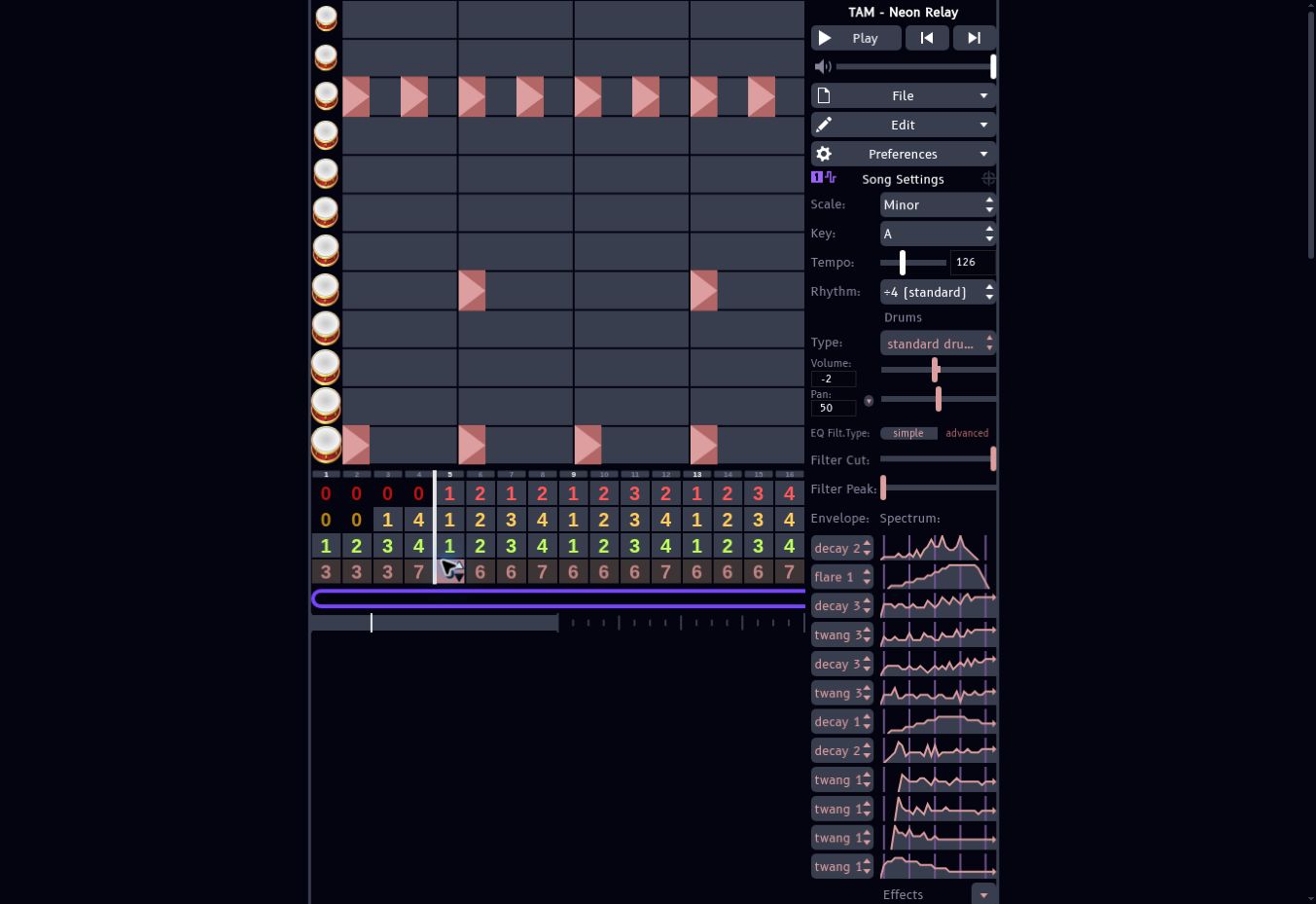
Pattern 7 is the fill. Copy the main pattern first, retain the groove through the first three beats, and use three short end-of-bar hits at positions 14, 15 and 16. In the supplied project those use lanes five, three and four. The final three sixteenths replace part of the regular upper pulse rather than adding an uninterrupted second stream of hits.
Pattern 3 is sparse: low hits at positions 1 and 9, with upper hits at 3, 7, 11 and 15. Pattern 4 is the closing hit, combining lanes one and eleven on the downbeat. Four drum patterns are enough to create a useful hierarchy: main groove, fill, reduced groove and stop.
Listen to where the bass moves around the low drum pulse. Danceability comes from a dependable reference point plus small disagreements around it. If everything hits together all the time, the track can feel heavy without moving forward. If nothing agrees on where the beat is, it loses its footing.
Give the bass a short, articulate FM attack
Select FM bass on the FM Bass channel. FM uses one oscillator to change another oscillator’s frequency. Its characteristic bite comes from the resulting sidebands; increasing a modulator’s amplitude changes harmonic complexity, rather than simply making a second audible oscillator louder.
| FM control | Project setting |
|---|---|
| Algorithm | 1 ← (2, 3 ← 4) |
| Operator frequency ratios | 2×, 1×, 1×, 20× |
| Operator amplitudes | 11, 7, 9, 3 |
| Feedback amplitude | 0 |
| Operator 2 amplitude envelope | twang 2 |
| Operator 3 amplitude envelope | twang 3 |
| Operator 4 amplitude envelope | twang 2 |
| Instrument Volume control | 10 |
| Reverb | Off |
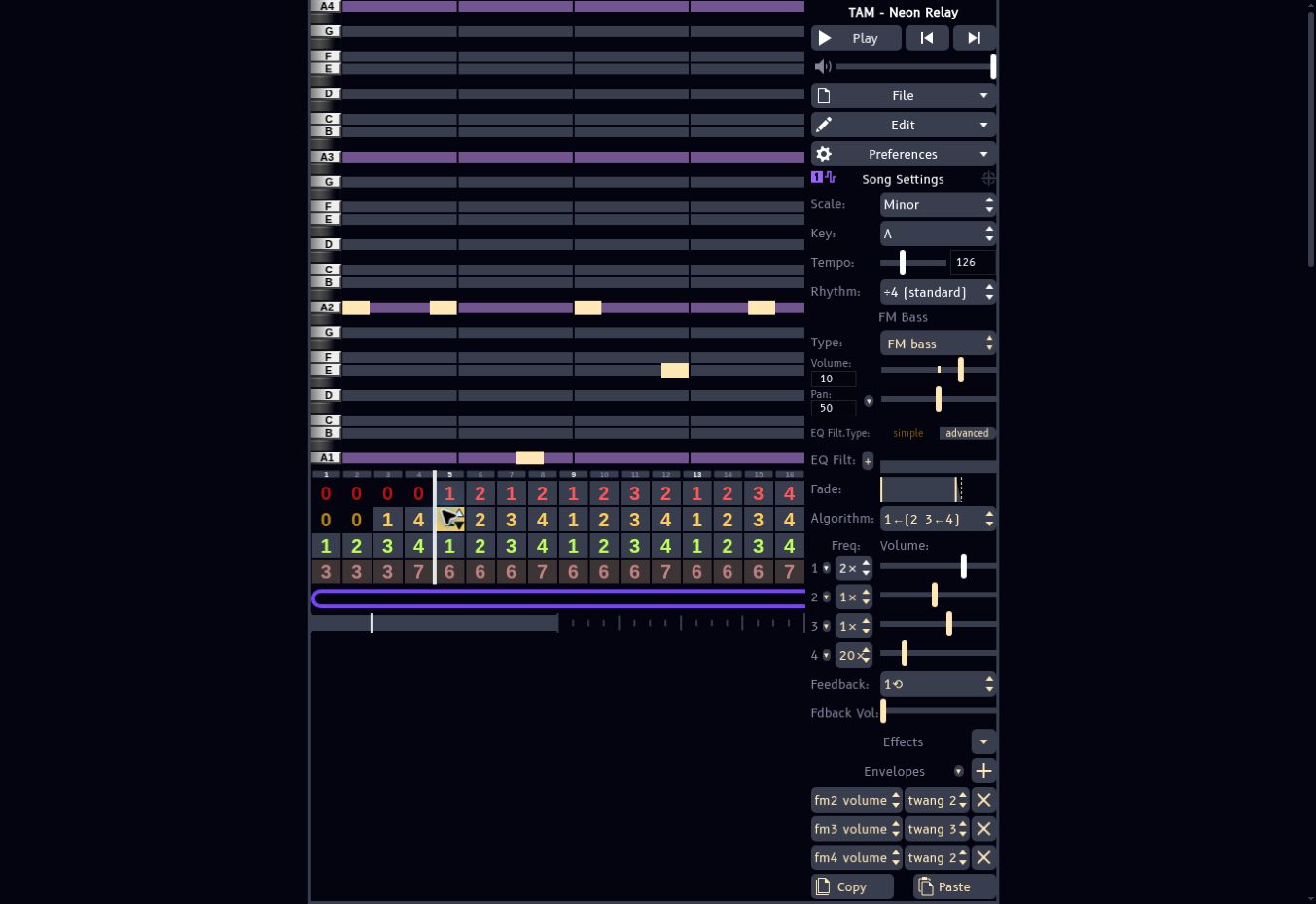
The twang envelopes make modulation strongest near the start, then reduce it. That produces an attack with definition and a simpler tail. It is often a better route to a cutting bass than pouring distortion over a sustained, harmonically crowded sound. The high-ratio fourth operator adds a small amount of edge; it does not need to dominate.
For bass pattern 1, use A2 at positions 1, 4, 9 and 15, A1 at position 7, and E2 at position 12. Each note lasts one sixteenth. Those placements make the gaps part of the groove. The octave drop adds weight without filling every empty space.
| Bass pattern | Root and supporting notes |
|---|---|
| 1 | A2, with A1 and E2 |
| 2 | F2, with C2 |
| 3 | C2, with G2 and E2 |
| 4 | G2, with D2 |
The other bass patterns keep the same timing and change the pitches to follow the harmony. This keeps the rhythmic identity intact while the song moves. Start with the supplied bass-only project if you want to change the sound without being distracted by the rest of the arrangement.
Troubleshooting a weak or cloudy bass
First check its octave and level. A high note with extra distortion does not become a deep bass note. Conversely, notes that are too low can disappear on small speakers. The supplied line includes upper roots and supporting notes to help it read on ordinary playback systems. Keep reverb off initially and judge the sound against the low drum pulse before adding effects.
Write a melody that can answer itself
The Lead channel uses supersaw lead. Its detuned oscillator group supplies width and a bright electronic edge. In the captured setup, Dynamism is 6, Spread is 7, Saw↔Pulse is 0 and PulseWidth is 50. The Volume control is 6 and Reverb is 21. These are JummBox control values, not percentages or calibrated decibels.
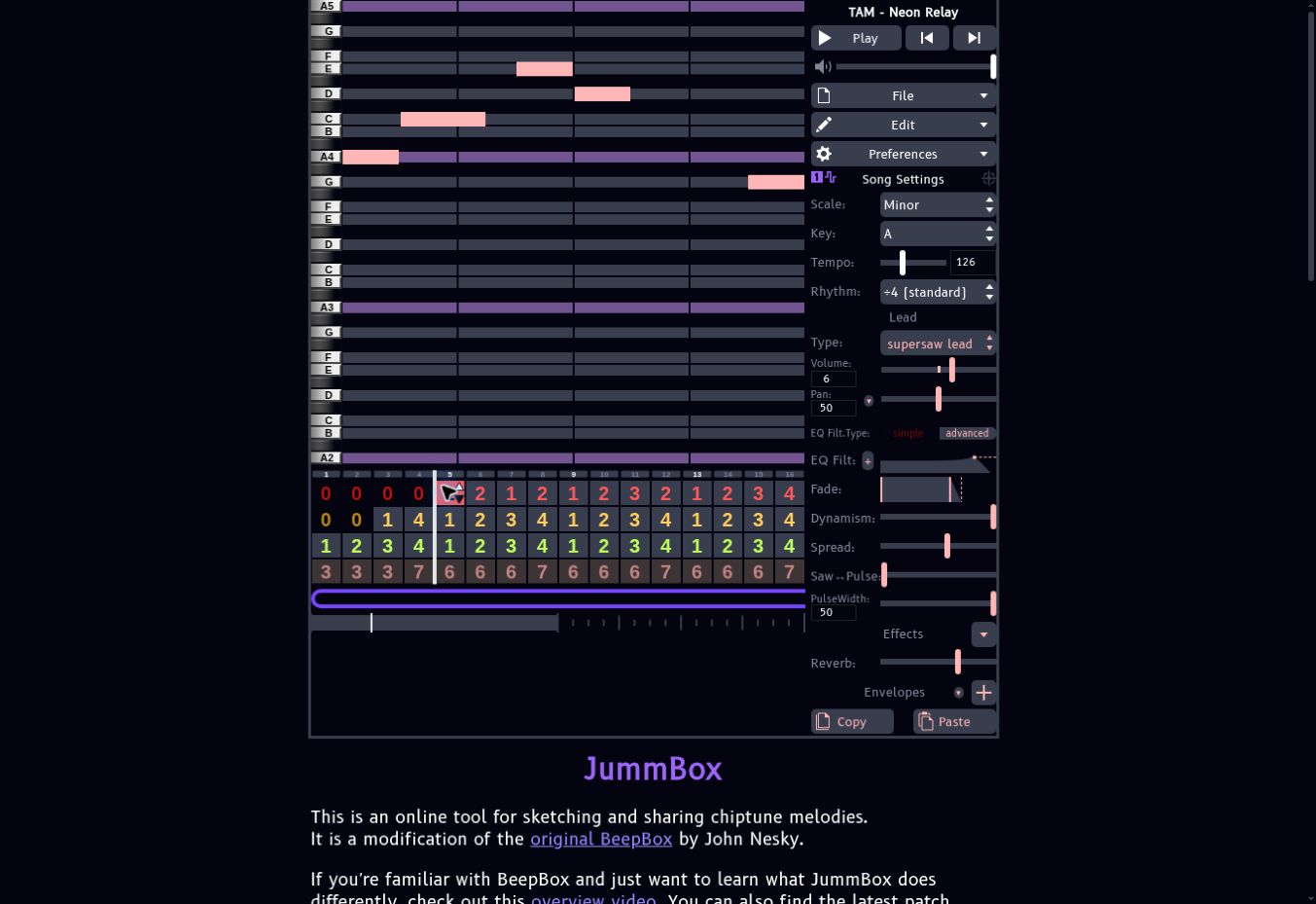
The first phrase uses A4, C5, E5, D5 and G4. Its sixteenth-grid starts are 1, 3, 7, 9 and 15, with durations of 2, 3, 2, 2 and 2 sixteenths. The uneven lengths are deliberate: the phrase should have a contour, rather than behaving like a row of identical fence posts.
Pattern 2 answers it with A4, C5, E5, F5, D5 and C5. Pattern 3 changes direction and register: G4, E4, D4, C4 and A3. Pattern 4 resolves through E4 and G4 to a longer A4. A small collection of related phrases gives the listener something recognizable without playing precisely the same bar throughout the track.
Leave the lead out of the opening four bars. Let the listener establish the groove first, then make the melody’s entrance an event. Later, remove it again briefly. A melodic sound can seem bigger when it returns even though you have not touched its level.
Width, reverb and distortion
Supersaw spread can make a part feel broad, but more is not automatically better. If the center of the track becomes vague, reduce spread or simplify another part. Reverb adds a tail that can blur the spaces between short notes. Keep the dry attack obvious. For extra aggression, enable distortion from Effects and increase it gradually while compensating the instrument level. That is a sound-design experiment; distortion is not enabled on the supplied lead.
Use harmony to give the loop a destination
The Harmony channel follows Am–F–C–G. Its supplied voicings are A2–C3–E3, F2–A2–C3, C2–E2–G2 and G2–B2–D3. Each chord lasts one bar. Use the polysynth pad preset, then set the Volume control to −5 so the chords support the more active parts.
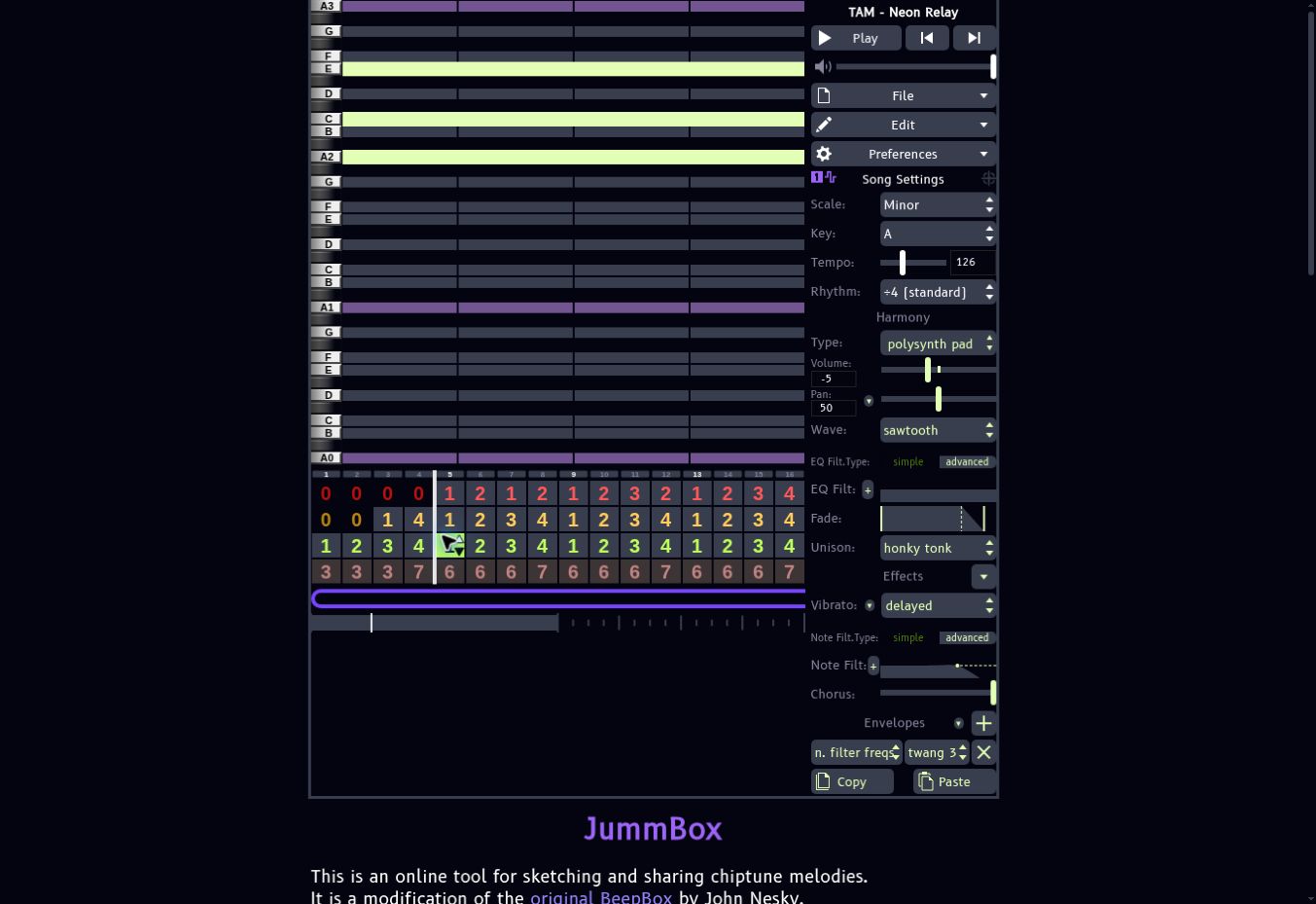
The preset uses a sawtooth wave, honky-tonk unison, delayed vibrato and chorus. Its note-filter frequency envelope is twang 3. That envelope closes the sound after each chord’s attack, keeping the beginning audible while giving the melody more room afterward. This is modulation at the note level: the movement restarts when the chord starts.
Do not judge harmony only in solo. A rich pad can sound impressive on its own and become a fog machine in the complete track. Our final bar returns to Am instead of G so that the ending feels settled. The bass likewise returns to A. That small departure from the repeating progression matters more than an elaborate extra effect.
Arrange 32 bars with a beginning, a change and an ending
| Bars | Musical purpose | What changes |
|---|---|---|
| 1–4 | Introduction | Chords and sparse percussion establish the setting; bass enters in bar 3, with a fill into bar 5. |
| 5–8 | First statement | Lead enters above the main groove and moving bass roots. |
| 9–16 | Development | Related lead phrases alternate with a lower contrast and a longer resolution; fills mark four-bar boundaries. |
| 17–20 | Contrast | Sparser drums and interrupted lead/bass create space. |
| 21–24 | Rebuild | Harmony continues while the rhythmic parts return in stages. |
| 25–28 | Full return | The main groove and melody re-establish the track. |
| 29–32 | Ending | Extra fill activity leads to a final Am chord, A bass and a single closing drum hit. |
The exact pattern-number arrangement
Each cell below lists four consecutive bars. Enter these numbers in the corresponding channel’s arrangement row; 0 leaves a silent bar. Pattern numbers refer to the supplied projects.
| Bars | Lead | FM Bass | Harmony | Drums |
|---|---|---|---|---|
| 1–4 | 0, 0, 0, 0 | 0, 0, 1, 4 | 1, 2, 3, 4 | 3, 3, 3, 7 |
| 5–8 | 1, 2, 1, 2 | 1, 2, 3, 4 | 1, 2, 3, 4 | 6, 6, 6, 7 |
| 9–12 | 1, 2, 3, 2 | 1, 2, 3, 4 | 1, 2, 3, 4 | 6, 6, 6, 7 |
| 13–16 | 1, 2, 3, 4 | 1, 2, 3, 4 | 1, 2, 3, 4 | 6, 6, 6, 7 |
| 17–20 | 3, 0, 3, 4 | 1, 0, 3, 4 | 1, 2, 3, 4 | 3, 0, 3, 7 |
| 21–24 | 0, 0, 1, 2 | 0, 0, 3, 4 | 1, 2, 3, 4 | 0, 3, 3, 7 |
| 25–28 | 1, 2, 3, 2 | 1, 2, 3, 4 | 1, 2, 3, 4 | 6, 6, 6, 7 |
| 29–32 | 1, 2, 3, 4 | 1, 2, 3, 1 | 1, 2, 3, 1 | 6, 7, 7, 4 |
The project uses one pass through all 32 bars as its export loop. A common trap is to arrange a complete song but leave the loop brace over only the opening few bars. Before rendering, check the export length as well as the visible song length. At 126 BPM, 32 four-beat bars should take about 60.95 seconds before any additional tail handling.
The arrangement is intentionally economical. A new layer, a missing layer or an alternate phrase can be enough to mark a section. If every change introduces another instrument, the song gets denser until there is nowhere left to go. Subtraction gives it some breathing room.
Try JummBox’s song-level modulation
The supplied track’s envelopes reshape individual notes; an automation channel can shape a whole passage. For an optional extension, open Edit → Channel Settings and add a modulation channel. Route a modulation slot to the pitched channel and instrument you want to control, then choose an available target. An effect must be enabled on the target instrument before its corresponding modulation option is useful.
A practical first experiment is a slow filter opening across the rebuild. Begin with a darker note filter, record or draw a gradual increase, and return to the intended full-section setting at the transition. Check the target channel, instrument and parameter carefully: a modulation pattern can exist without affecting the sound you are listening to.
In JummBox 2.6, you can record supported control movements while playback runs by holding Ctrl or Shift and moving a slider. Add a modulation channel first and use a regular grid such as ÷4 or ÷8. After recording, inspect the resulting pattern and remove accidental movements. These automation steps are an optional exercise; the downloadable track demonstrates its movement through note envelopes and arrangement instead.
Export audio, save the project and share the right link
Use File → Export Song. Export a JSON copy for editing and a WAV copy for audio production. JSON is not an audio file; WAV does not preserve editable notes, operator settings or arrangement decisions. Keep both. The application also offers MP3, MIDI and HTML exports. MIDI is useful for note transfer, but it cannot carry the full JummBox synthesis sound into another instrument.
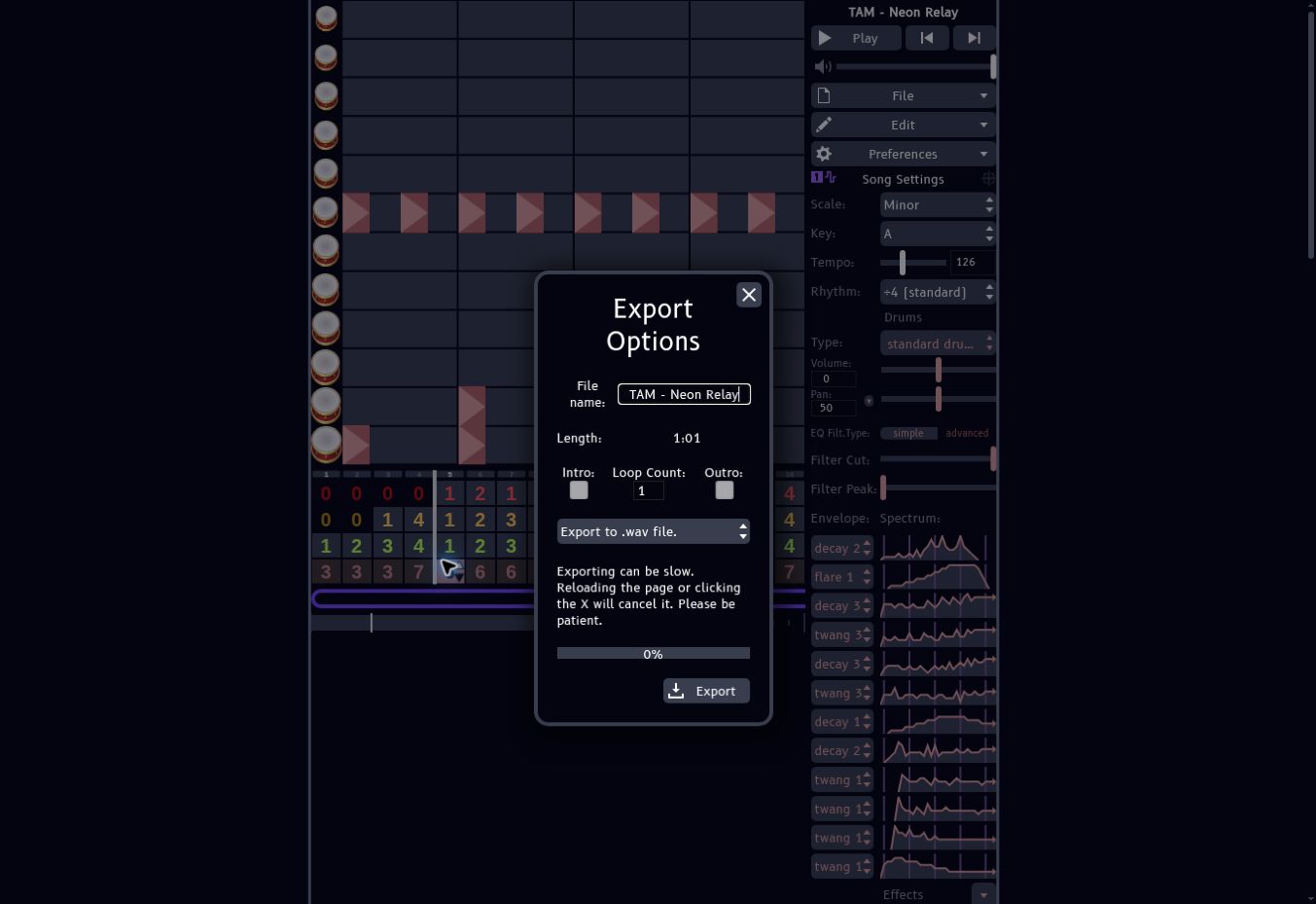
For the supplied renders, the full song and each isolated demonstration were exported using JummBox’s WAV exporter. The source WAVs are 48 kHz stereo. The article’s players use 128 kbps MP3 copies for faster loading: roughly a quarter of a megabyte for a 15-second example and about one megabyte for the complete track. No replacement synthesizer generated these examples.
Use File → Copy Song URL to share the composition. JummBox stores the song data after the URL’s # character. Copy the entire link, not merely jummb.us. Open that saved link in a fresh tab before sending it. Export JSON as a second backup, especially before extensive sound changes or browser cleanup.
To continue in a DAW, import the WAV at 126 BPM. Keep the original render at unity first and check alignment before adding effects. If you need independent processing, use the separate project versions or export additional isolated parts. Leave a sensible amount of headroom rather than trying to make every channel individually loud.
Troubleshooting: silence, wrong notes and incomplete exports
The project opens but makes no sound
Press Play to satisfy the browser’s audio-start requirement. Check the tab’s mute state, computer output device and JummBox’s main volume. Confirm that the playhead is inside populated bars and that the selected arrangement cells are not all zero. A blank currently selected pattern does not necessarily mean the entire song is empty.
An edit changed several bars at once
Those bars probably reference the same pattern number. Undo, copy the original pattern into a different unused number, then edit the copy. Pattern reuse is efficient for a groove; it is inconvenient when you intended to make an independent fill.
A bass or melody is an octave away from the screenshot
Turn on Show Piano Keys and read the octave labels. Match pitches, not the visual height of a note on someone else’s screen. Each channel has its own octave view, and browser size can change the editor’s proportions.
The exported audio is shorter than the arrangement
Check the loop brace and Export Options length, loop count and any enabled intro/outro selections. Make a one-pass export first. Do not assume that extending the song also extended the playback loop. Keep the tab open until the download completes; reloading cancels an export.
The MIDI export sounds different in a DAW
That is expected when another instrument renders the notes. A MIDI file is a performance description, not a recording of JummBox’s oscillators, filters and effects. Use WAV when the sound itself is what you need to preserve.
JummBox FAQ
Is JummBox free?
Yes. The official application is available in the browser, and its site provides an offline version. It states that original compositions belong to their authors. That does not give you rights to somebody else’s melody or copyrighted material you reproduce.
Can I import a BeepBox song?
JummBox provides a JSON import workflow for compatible song data. Keep the original project and check the result before replacing it. JummBox-specific modulation and settings should not be assumed to survive a return trip into every BeepBox version or other fork.
Do I need a MIDI keyboard?
No. Neon Relay was built through the pattern editor. A keyboard can help you find phrases, but note placement, duration and chord entry are all available without one.
Is the main volume slider my mix balance?
No. It changes listening level. Balance the instrument Volume controls and note levels to decide which parts lead and which support them. The supplied project’s Volume values are 6 for lead, 10 for bass, −5 for harmony and −2 for drums.
Why is the bass-only example quieter than the drums?
The isolated versions preserve their role in the mix rather than independently maximizing every excerpt. Adjust your playback level for inspection, then return to the complete track to judge balance. Large low-frequency excursions and perceived loudness are different things.
Where should I go next within TAM?
Use our BeepBox composition guide for the foundational grid workflow. For related free tools, browse the ChipTone sound-effects entry and DrumGizmo acoustic-drum entry. Those cover different jobs: short synthesized effects and sampled acoustic drums, respectively.