Product News
TapeSplitter: I Got Tired of Cutting Up DAT Transfers, So I Made an App to Do It
In this article
An old collection of DAT tapes, a tedious editing job, and a surprisingly useful experiment with AI-assisted software development.
I have a lot of old DAT tapes. Probably more than I should.
Some contain finished mixes, others have alternate versions of songs, and quite a few are collections of material recorded over various studio sessions. I’ve transferred a number of these tapes to my computer over the years, which solved one problem while creating another: instead of a pile of DAT tapes, I now have a pile of very long digital audio files.
Progress, I suppose.
One DAT transfer might contain 40 songs, some of them mixes that stop after a minute because somebody made a mistake and the take was abandoned. But the result is still one long WAV file. Finding each mix, marking its beginning and end, exporting it and naming it isn’t particularly difficult. It’s just tedious. And when you have a lot of recordings, tedious becomes a pretty good reason to put the whole project off indefinitely.
Surely somebody has already solved this
That was my assumption. I have Fender Studio Pro and Audacity, and both can separate recordings into individual files. But I didn’t want another editing session. I wanted to point an application at my DAT transfers, have it locate the gaps, and save the individual songs.
I looked at dedicated splitting utilities, too. Some came close, but none was quite the simple workflow I had in mind. Then I wondered whether I could just have AI build it.
What if I asked Gemini to make it?
I described the problem to Google’s Gemini and asked it to create an application. I’m an audio engineer, not a professional software developer, but I knew exactly what I wanted the program to do—and I could tell when it wasn’t doing it.
Gemini produced an initial version. I tried it, found things that needed attention, and asked for revisions. We went back and forth a few times. Then something rather satisfying happened.
It worked.
Not merely in the sense that the application opened without crashing. It actually did the job. I called it TapeSplitter, and decided to make it available free through The Audio Magazine.
A small application that solves a real problem
TapeSplitter is a Windows utility for turning long WAV tape transfers into separate WAV tracks. It uses adjustable silence detection rather than AI song recognition: AI helped create the program, but isn’t secretly listening to your mixes and deciding what counts as a song.
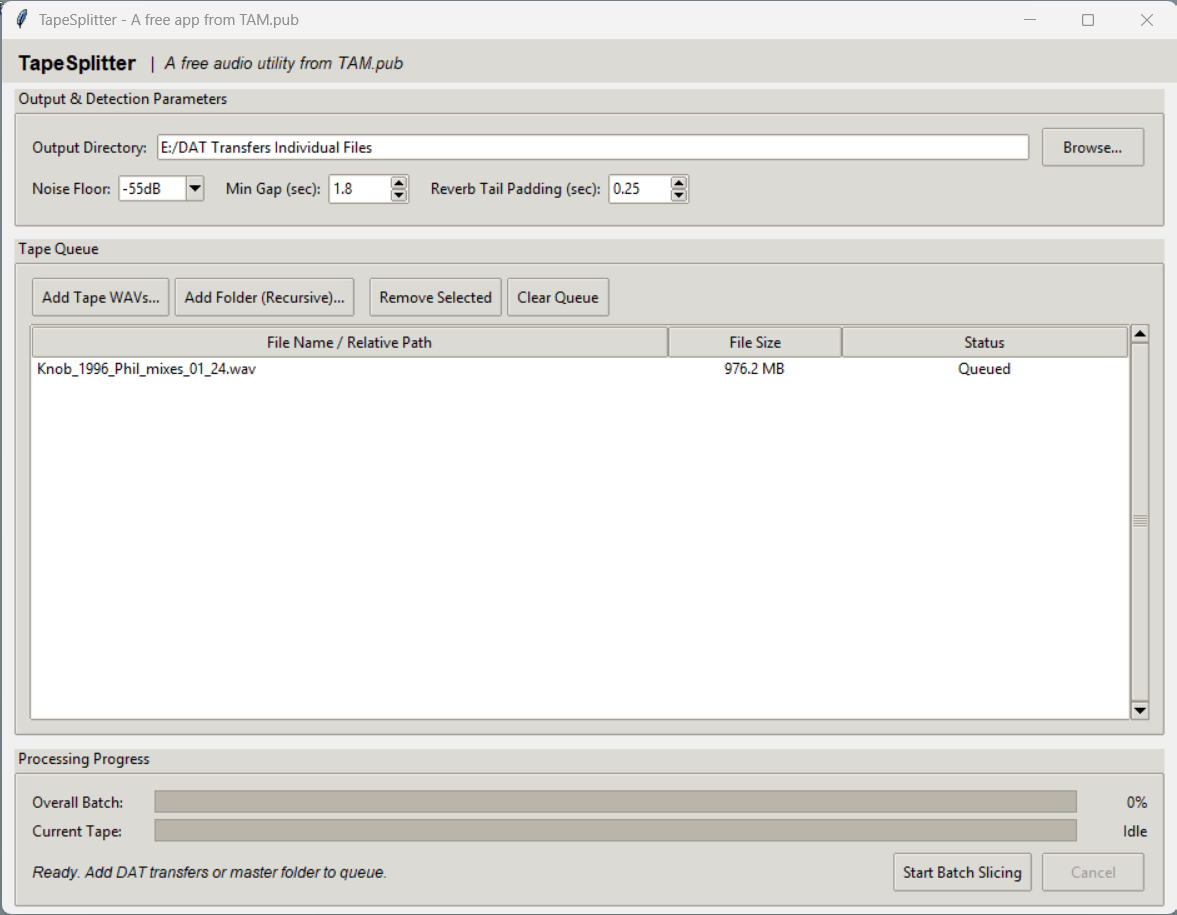
The interface lets you add individual WAVs or recursively load an entire folder of transfers. You choose an output directory, adjust the Noise Floor, Min Gap and Reverb Tail Padding, then select Start Batch Slicing. Progress indicators show how the batch is going. The application also generates a compilation_index.csv with track filenames and source positions, which is handy when you’re trying to remember which tape a particular mix came from.
For reference, my screenshot shows a −55 dB noise floor, a 1.8-second minimum gap and 0.25 seconds of tail padding. Those aren’t magic numbers; the right settings depend on the recordings.
There are limits to any silence-based approach. A quiet passage in a song can look like a gap, and two songs running together may not offer a gap at all. Check the results, particularly fades and quiet introductions. And keep the original transfers. I certainly don’t intend to digitize all those tapes again.
The unexpected part
What I find almost as interesting as TapeSplitter is how it came into existence. I had a fairly mundane studio problem, described it in ordinary language, tested what came back and refined it until the application was useful.
That doesn’t mean AI-generated software should be trusted without testing. It does suggest that people who understand a specialized problem can now create tools for it without first becoming software developers. In this case, it saved me a lot of repetitive editing. That’s a result I can appreciate.
Download TapeSplitter free
TapeSplitter 0.95 is available free for Windows. I’ve tested it on Windows 11; compatibility with other versions hasn’t been established. It accepts WAV transfers and exports separate WAV tracks. The downloadable 64-bit executable includes its required runtime and FFmpeg components.
Download TapeSplitter 0.95 for Windows (free)
You can also find it in TAM’s Free Software Directory.
It’s an unsigned executable, so Windows or your browser may warn you about it. Scan downloads with your security software and don’t disable protections to run it. A limited Microsoft Defender scan during release preparation found no threats, but that isn’t a comprehensive security audit.
SHA-256: 3070bcc338b9010c0db5eea8a0434f940790d70eb4db76543a5c9358c1734bb9
There are no grand ambitions here. I wanted a practical tool for my own recordings, it works for that job, and I suspect other people with DATs, reel-to-reel transfers, cassettes or rehearsal archives might find it useful too.
I still have plenty of old recordings to sort through. At least now I have one less excuse for not doing it.
Developed with assistance from Google Gemini. Released by The Audio Magazine.