
Stochas
By Surge Synth Team / Audio Vitamins
Overview
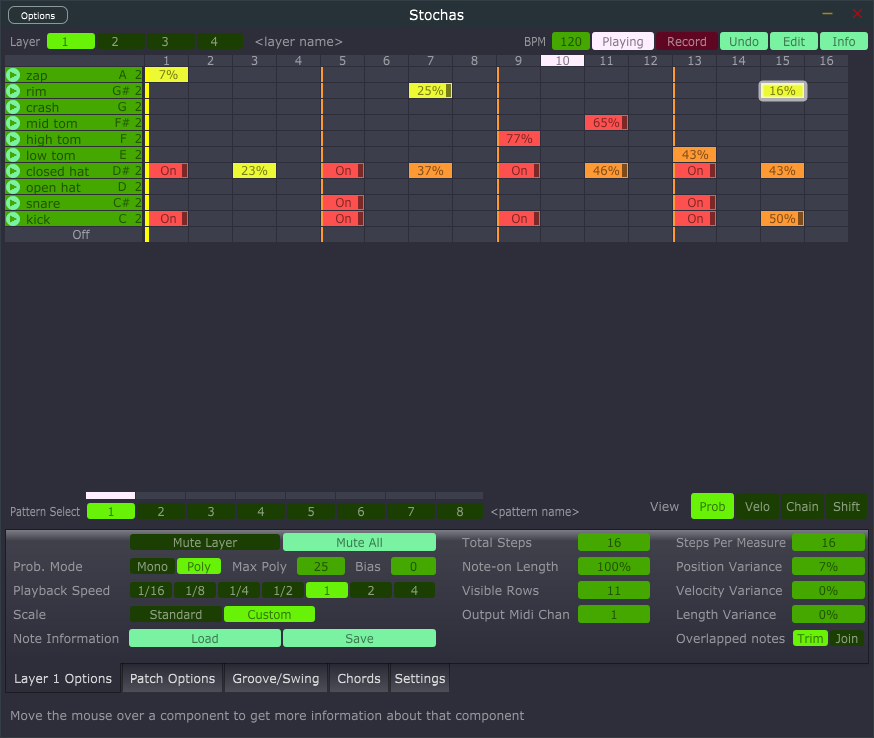
Stochas is a probabilistic step sequencer for creating MIDI patterns that change as they repeat. Notes can carry different chances of playing, while independent layers use different lengths, speeds and channels. It is useful for evolving drum parts, generative melodies and polyrhythmic accompaniments. The open-source project continues the original Audio Vitamins software under the Surge Synth Team.
Stochas supplies performance instructions rather than synthesizing the sound itself. Connect its output to a drum instrument, sampler or synthesizer, and keep that receiving instrument in the saved session. Recording the generated MIDI or audio is useful when a particular variation should become a fixed arrangement.
Installation and requirements
Choose a stable release from the official download page for Windows, macOS or Linux. Install a supplied format supported by your host and rescan plug-ins. A standalone build can also send MIDI to a separate instrument where supplied. Do not assume an AU MIDI-effect workflow and a VST3 routing workflow use the same host settings; follow the documentation for your DAW.
Getting started
Route Stochas to a drum instrument and create a short kick, snare and hi-hat pattern. Start with dependable main hits, then lower the probability of a few extra hats or ghost notes. Play several cycles, adjust velocities, and save the patch plus routing. Capture a favored variation into the arrangement when needed.
Official product and download information
Compatibility and classification
Platforms: Linux, macOS, Windows
Categories: MIDI Tools, Sound Design
Formats: Audio Units (AU), Standalone, VST3
License: Open source
Free edition restrictions
Generates MIDI rather than instrument audio; a separate synthesizer or drum instrument and suitable MIDI routing are required. Formats differ by platform/release; AAX is not included by default. Nightly builds are separate from stable releases.