DAW Reviews
Bitwig Studio 6.1 Review: Our Favorite Creative DAW
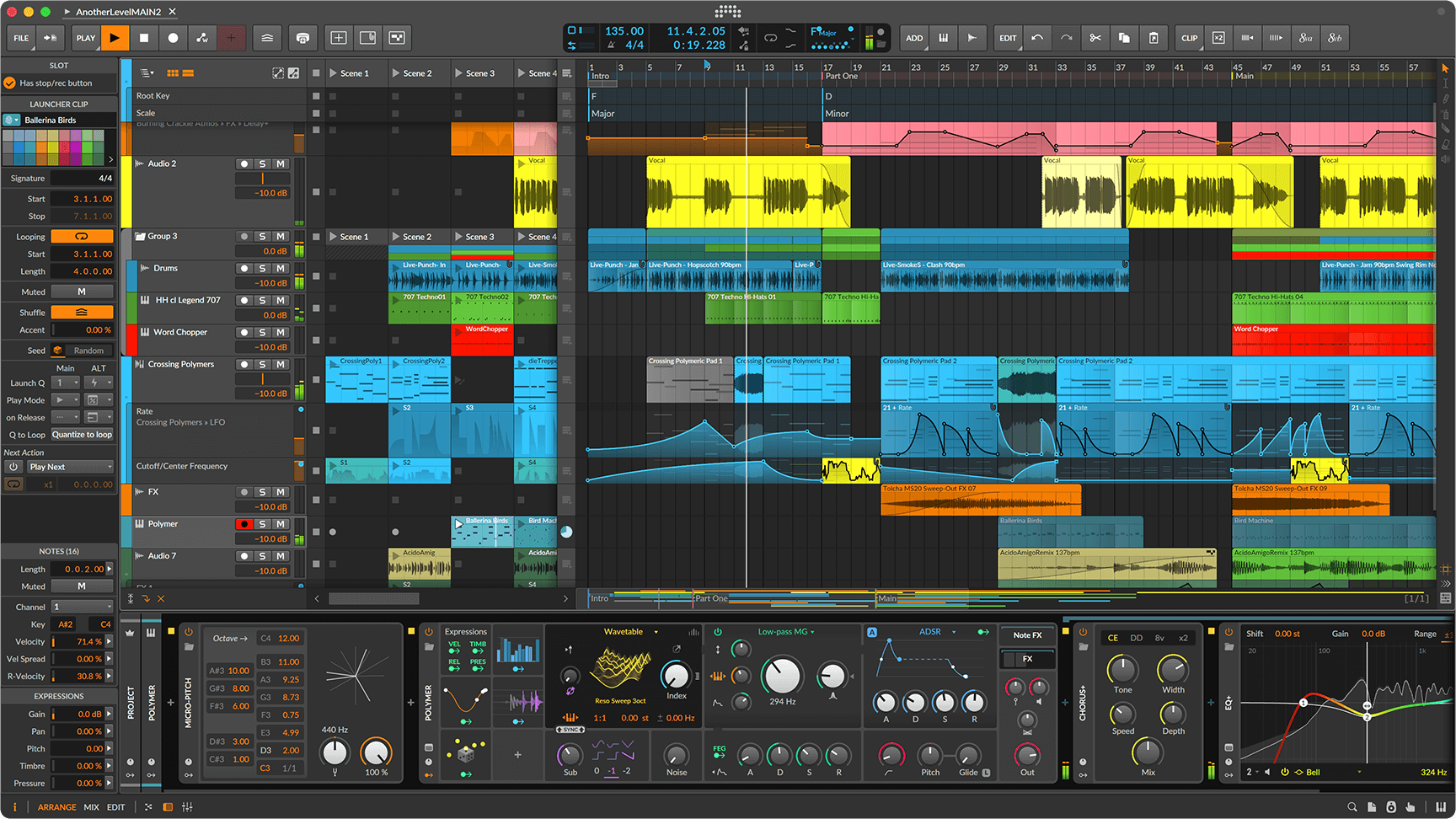
Bitwig Studio is simply the best creative DAW we have used. It takes time to learn, as any serious recording program does, and its look and feel are different from other workstations. Once that becomes familiar, the way it displays signal flow and shows what is happening inside synthesizers and complex processing chains is a major advantage.
We have run it on a Mac Studio and on Windows machines, with great results on both. It also keeps improving. The current 6.1 release builds on an already exceptionally capable environment for making and shaping music.
Seeing how the sound is made
The visual presentation is one of Bitwig’s most important strengths. When working with synth engines or elaborate processing, we value being able to see the signal’s route and how it is being shaped. Bitwig communicates those relationships particularly well. For us, this is a practical reason to choose it.
Its device chains, nested devices and modulation system help explain that flexibility. Instruments and effects can be combined and controlled within the workstation, with modulation available beyond a single instrument. The interface brings those connections into the same working environment as recording and arranging.
The Grid and creative processing
The full edition of Bitwig Studio includes The Grid, its modular sound-design environment. Poly Grid, FX Grid and Note Grid provide ways to build instruments, audio effects and note-processing systems. Modules are connected visually, and selecting a module exposes its incoming and outgoing signals in the inspector.
That is a useful example of Bitwig’s approach: complex processes can be presented in a way that makes their structure understandable. The Grid also includes interactive module help, so the explanation and the controls are available together.
Recording and arranging
Bitwig combines a conventional arrangement timeline with a Clip Launcher for trying ideas and performing with clips. Its audio, instrument and hybrid tracks support recording and production alongside the sound-design tools. VST and CLAP plug-ins are supported, and the software is available for macOS, Windows and Linux.
Our own experience covers Mac Studio and Windows systems. Results have been great on both; we have not included a Linux assessment here.
What version 6.1 adds
Version 6.1, released in August 2026, substantially expands the Sampler. It adds sliced-sample configurations, automatic pitch analysis and new ways to play and manipulate sampled material. Spectral mode provides time stretching, while Fragments introduces granular playback. Those two modes are exclusive to the full Bitwig Studio edition.
The update also adds a Tuner device and module. These are documented product features; our central verdict comes from the broader experience of using Bitwig as a creative workstation, rather than a separate test of every new function.
The learning curve
It takes a little while to understand Bitwig. Its interface and working habits differ from those of other DAWs, so familiarity with another program does not remove the need to learn this one. That is the main reservation in our experience.
For us, the time is worthwhile. The clarity of the signal-flow presentation and the depth of the creative tools make a strong case for getting comfortable with its approach.
Verdict
Bitwig Studio remains our first choice as a creative DAW. We have had great results on Mac Studio and Windows, and the software continues to improve. Its different look and feel require some adjustment, but the way it presents synthesis, modulation and complex processing is exceptional. Highly recommended for musicians and producers who want to explore sound as part of making music.
Bitwig Studio features and editions · The Grid · Version 6.1 features