DAW Reviews
Bitwig Studio 6.1 Review: Our Favorite Creative DAW
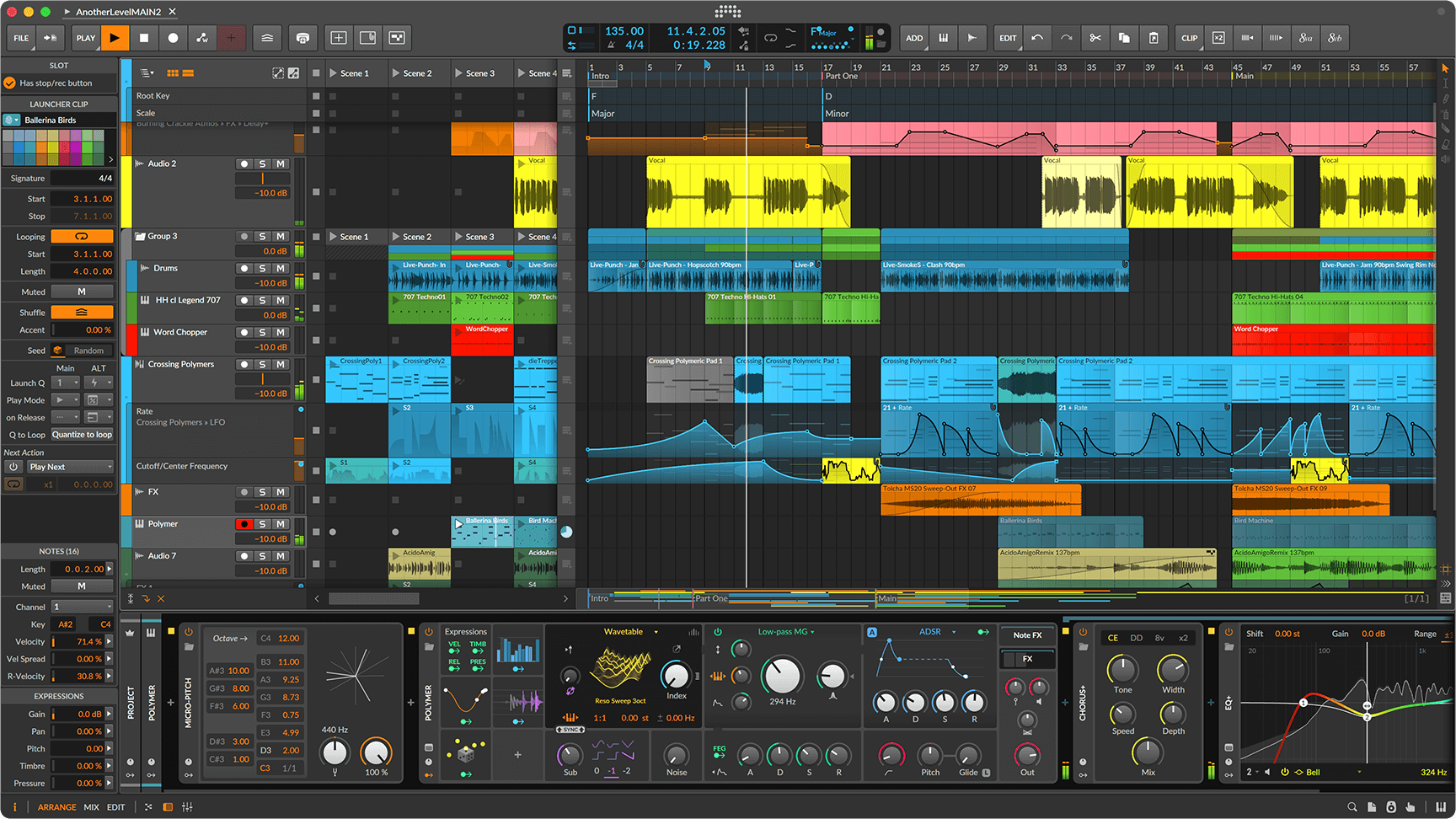
We have used Bitwig Studio for years, through enough versions and on enough computers that this is no longer a first-impressions review. It has become the DAW we reach for when the object is to make music, manipulate sound and follow an idea before it disappears.
That distinction matters. There are DAWs we might choose ahead of Bitwig for a large conventional tracking session, and there are established mixing environments with workflows that make more sense when the job is simply to mix. For creative work, however, Bitwig is our first choice.
A DAW that evolves without getting in the way
One of the things we appreciate most is how Bitwig has evolved without repeatedly rearranging the application around us. Major versions bring genuinely useful additions, but the basic logic remains recognizable. We have never had the feeling that an update was designed to prove that the interface had changed.
In that respect, Bitwig occasionally reminds us of the original Propellerhead ReBirth RB-338—not because the programs do the same thing, but because both make a lot happen inside a remarkably direct working environment. Modern music software has a tendency to spread itself across menus, windows and acres of screen space. Bitwig can become extraordinarily sophisticated, yet it still feels compact and efficient.
And it sounds exceptionally good
This was almost completely missing from our original review, and it should not have been: Bitwig sounds excellent.
Even working largely with the stock instruments and effects, we consistently get a sense of depth and space that is unusually convincing. The soundstage can seem wider and more immersive, and complex arrangements retain a dimensional quality that encourages us to keep working. We are not suggesting that a DAW summing engine possesses some mysterious magic. We are describing the result of working with Bitwig’s instruments, effects, modulation and signal paths as a complete production environment. Whatever combination of those elements is responsible, we like what comes out of it.
The included devices are not things we use merely because they are convenient. They are good enough that there is often no reason to reach immediately for a third-party plug-in.
The best visual feedback we have used
Bitwig’s visual design is not decoration. It tells you what the program is doing.
That is especially true of modulation. Assign a modulator to a parameter and the interface makes the relationship obvious: the parameter’s base value and the amount and movement of modulation can be understood at a glance. With a complicated synthesizer patch or effects chain, that is enormously useful. We have not used another DAW that communicates modulated parameters as clearly.
The same thinking extends to device chains and signal flow. Bitwig can be deep without constantly hiding that depth behind another window. Once you become accustomed to the visual language, complicated patches are easier to understand because you can actually see what is happening.
Modulation and The Grid
Modulation is fundamental to Bitwig rather than an advanced feature tucked into a corner of the program. Modulators can be applied throughout a device chain, and the full version includes The Grid: Poly Grid for instruments, FX Grid for effects and Note Grid for note processing.
The Grid can go very deep, but it benefits from the same visual discipline as the rest of the application. It feels like part of Bitwig rather than a modular environment bolted onto it. You can build an instrument or processor, connect it to the rest of a project and continue working without changing mental gears.
A surprisingly complete instrument and effects collection
It is easy to think of Bitwig primarily as a host for third-party instruments, but the supplied devices are a substantial part of why we enjoy using it. Polymer is an excellent compact synthesizer, while Polysynth and Phase-4 broaden the palette considerably. Sampler has grown into a serious instrument in its own right, and Drum Machine makes building and manipulating kits particularly immediate.
The effects side is equally useful. Delay+, Convolution, EQ+, the Spectral Suite and Bitwig’s various dynamics, distortion, filtering and modulation processors cover an enormous amount of territory before a third-party plug-in is necessary. More importantly, these devices participate naturally in Bitwig’s modulation system rather than feeling like separate plug-ins living inside the application.
There is also a large library of downloadable Bitwig sound content. Among the packages are Polymerics, Sampled Synths, Analog Waves, Classic Drum Machines, Bitwig Drum Machines, Bass-08, Acoustic Drums and Percussion, orchestral collections and numerous artist and partner libraries. Some are essentially preset collections, others contain substantial multisampled instruments, kits, loops and clips. They are installed as needed, so the program does not have to arrive as one enormous monolithic download.
Which version?
Bitwig is sold in three main editions: Studio Essentials, Studio Producer and the full Bitwig Studio. Our experience and comments in this review refer to the full Bitwig Studio.
Essentials provides the core recording and arranging environment with unlimited audio, instrument and hybrid tracks, Polymer, Sampler, Delay+, a smaller modulation system and an essential sound library. Producer adds substantially more instruments and effects, Polysynth, more modulators, additional stretching algorithms, multi-output plug-in support, comping and an expanded content library. The full version adds the complete device and modulation collection—including Phase-4, Convolution, EQ+, the Spectral Suite and the full Sampler—plus the complete sound library and, importantly, The Grid.
There is no permanently free edition available directly to everyone, although Bitwig Studio 8-Track—a deliberately restricted edition with eight main project tracks and a useful subset of the instruments and effects—is frequently bundled with third-party hardware and software. For anyone simply wanting to find out whether Bitwig’s way of working makes sense, the more useful option is Bitwig’s 30-day free trial, which runs the full program without feature limitations.
Stability has been extraordinary
Our experience with Bitwig’s stability has been remarkable. We have run it on a Mac Studio, a Lenovo workstation with dual Xeon processors, and Core i5 laptops. Across years of use on those very different machines, Bitwig has never crashed on us. Not once.
That is an unusually strong statement to make about a DAW, and it is one of the reasons we trust it. Our experience obviously cannot guarantee that every combination of interface, plug-in, driver and computer will behave the same way, but we can report what has happened here: Bitwig has been exceptionally dependable.
Recording, arranging and mixing
Bitwig is a complete DAW, not simply a sound-design program. It provides the conventional Arranger alongside the Clip Launcher, handles audio and instrument tracks, supports comping, and works with VST and CLAP plug-ins. It is available for macOS, Windows and Linux.
But choosing a DAW is partly about emphasis. If our only job were recording a band and then mixing 80 conventional audio tracks, Bitwig would not automatically be our first recommendation. Other DAWs have spent decades refining workflows specifically around tracking and mixing.
If the computer is part recorder, part instrument and part laboratory, the calculation changes. Moving from an arrangement into modulation, synthesis, sampling or fairly extreme audio manipulation feels unusually natural in Bitwig. That is where it separates itself.
What 6.1 adds
Version 6.1 puts much of its attention on Sampler. It adds sliced-sample operation, pitch analysis, Spectral stretching and the new Fragments granular mode, while also revising existing Sampler modes and adding a Tuner device. There are numerous workflow refinements as well.
We like the additions, but they are not why we recommend the program. More important is that Bitwig can keep adding capabilities without turning a familiar workstation into an unfamiliar one. The application we have used for years is still there; it simply does more.
Verdict
Bitwig Studio is our pick for a creative music and sound-manipulation DAW. It is compact, fast to work in, visually exceptional and, in our experience, extraordinarily stable. More importantly, it encourages experimentation without making the mechanics of the software the center of attention.
There may be better choices for a dedicated tracking room or for someone whose work begins and ends with conventional mixing. But when composition, synthesis, sampling, modulation and audio manipulation all overlap, we would rather work in Bitwig. And after years of using it, that preference has become stronger rather than weaker.
Specifications
- Platforms: macOS, Windows and Linux
- Editions: Bitwig Studio Essentials, Bitwig Studio Producer and Bitwig Studio; limited Bitwig Studio 8-Track also available through partner programs
- Edition tested by TAM: Full Bitwig Studio
- Current version reviewed: Bitwig Studio 6.1
- Workflow: linear Arranger and nonlinear Clip Launcher
- Plug-in support: VST and CLAP
- Included sound design: instruments, audio and note effects, modulation system and Sampler
- Modular environments: Poly Grid, FX Grid and Note Grid in the full Bitwig Studio edition
- Version 6.1 highlights: expanded Sampler with sliced, Spectral and Fragments operation; pitch-analysis improvements; Tuner device
- Tested by TAM on: Mac Studio; Lenovo dual-Xeon workstation; Core i5 laptops
Bitwig Studio editions · 30-day free trial · Sound content · The Grid · Version 6.1 features
Reference
Specifications
- Developer
- Bitwig GmbH
- Type
- Digital audio workstation and modular music-production environment
- Current reviewed version
- Bitwig Studio 6.1
- Platforms
- macOS, Windows, Linux
- Tracks and scenes
- Unlimited audio, instrument and hybrid tracks and scenes
- Plug-in support
- Unlimited VST and CLAP plug-ins with sidechain and multi-output support
- Audio I/O
- Unlimited audio I/O buses
- Sampler
- Integrated Sampler with slicing, multisample editing and multiple playback modes
- Modulation
- 43 modulators across the modulation system
- Modular environment
- The Grid for instruments, audio effects and note effects
- Audio stretching
- 8 time-stretching algorithms
- MIDI / hardware
- MIDI, CV, MPE and multitouch integration
- Minimum display
- 1280 × 768 pixels
- Minimum RAM
- 4 GB
- Disk space
- 26 GB free for full content installation
- Windows
- Windows 10 or 11, 64-bit; AVX2-capable AMD or Intel CPU
- macOS
- macOS 12 Monterey or later; Apple silicon or 64-bit Intel CPU with AVX2 support
- Linux
- Ubuntu 24.04 or modern distribution with Flatpak; 64-bit x86 CPU with AVX2 support
Specifications from Bitwig Studio documentation.